


Hello everyone!
Before that, plc247.com made 1 Series of instructions for using different devices to control connection of Omron Temperature Controller E5CC via “Modbus-RTU” Communication.
Today I would like to continue to guide you to control another temperature controller, Autonics TK4S-Series. And first I will use the Weintek MT8071iE HMI monitor to connect the TK4S control directly.
TK4S & MT8071iE “Wiring Diagram”
plc247.com use MT8071iE COM.3 port along with connectivity (8bit /Even /Stop bit = 1)

Autonics TK4S Communication Setting
To set Modbus communication parameters for TK4S we need to go to Parameters 4 (Par4) of the clock to set the following parameters:
+ PAr 4
- AdrS = 1 (Address Slave)
- bPS = 9.6 (Baudrate)
- Prty = EvEn (Parity Check)
- StP = 1 (Stop bit)
- rSy.t = 20 (Comm. Response time)
Register Setting Temperature Address
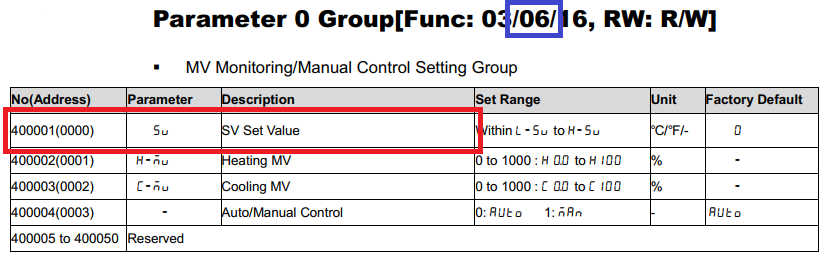
+ Function: 06
+ Setting Value (SV) Address: 0000 (hex)
Register for Temperature Monitoring

+ Funtion: 04
+ Present Value (PV) Address: 3E8 (hex)
Weintek MT8071iE Modbus Configuration

MT8071iE Programming
+ Control Panel

+ TK4S #1 Temperature Setting

+ TK4S #2 Temperature Setting

+ TK4S #1 Temperature Monitoring

+ TK4S #2 Temperature Monitoring

Video Tutorial
======
Recommended software and documentation
+ EasyBuilder Pro for HMI Weintek Programming Software
+ Autonics TK4S Communication Manual PDF
Password: plc247.com
If you have any difficulties in connecting the HMI MT8071iE and the TK4S controller, please comment below the article.
Thanks and Best Regards!
