


Hello everyone. PLC Delta DVP-14SS2 is Delta’s best-selling PLC. It is super cheap, compact in size, but can control 2 axes of Step or Servo motors.
Today plc247.com would like to write a tutorial on how to use Delta PLC to control Mitsubishi MR-J4-A Servo motors, this is also an extremely common type of Servo in most factories.
DVP-14SS2 & MR-J4-A Servo “Wiring Diagram”
Here is the simplest wiring diagram that can control the motor:

I/O Address Table:
+ Input:
- X4: DOG (Origin) Sensor (Normally Open)
- X5: Left Limit Sensor (Normally Open)
+ Output:
- Y0: Pulses Output
- Y1: Direction Output
- Y2: Servo-ON Output
Mitsubishi MR-J4-A Driver Configuration
With the MR J4 configuration you need to pay attention to two main parameters:
- PA1: Servo control mode selection > Set to “1000” to select the position control mode.
- PA6/7: CMX/CDV: Input pulse gain ratio. Used to correct the change of the number of pulses / revolutions when issuing a command from the PLC to the Servo. The default is 1/1, which corresponds to 131072 pulses / rev.
- PA13.PLSS: Selection of control pulse types: Default is 0100, change the following two factors to select pulse input type. Please see the table below to choose the appropriate control method:

For this project, plc247.com chooses to set the following parameters:

Delta DVP-14SS2 Programming Instructions
In the project use 2 main commands which are:
Zero Return (Origin Return) Command

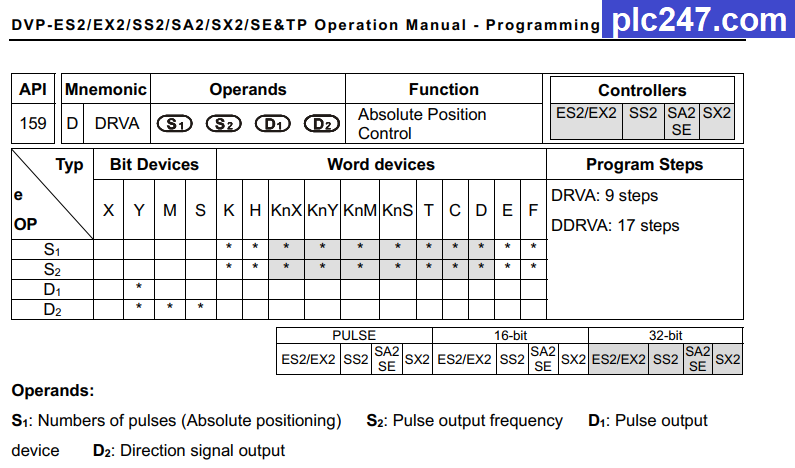
Absolute Pulses Output Command
PLC Programming
+ Below is a program that can control 3 points of Servo motor. Very short and simple.

Project Tutorial Video
======
Required software and documention:
+ Delta WPLSoft for PLC DVP14SS2 Programming
+ MR-Configurator2 for MR-J4-A Parameters Setup
If you have any questions about using DVP 14SS2 to control a stepper motor or Servo, please comment below the article, plc247.com will answer as soon as I read it.
Best Regards!
