


Continuing with the series of articles on how to control LS iG5A VFD via Modbus-RTU (RS485) communication standard, today plc247.com would like to continue to guide you to use PLC Keyence to control
We can use any Keyence PLC of KV-Series in combination with Module KV-L21/21V to connect.
Keyence KV-L21V & LS iG5A VFD Connection Diagram

LS iG5A Configurator
In addition to the basic parameters for the motor installation, we need to set the communication parameters according to the following table

+ Drv = 3
+ Frq = 7
+ I59 = 0
+ I60 = 1
+ I61 = 3
+ I62 = 0
+ I65 = 2
Modbus Regigter Address

Note: PLC Register Address = “Address – 1”

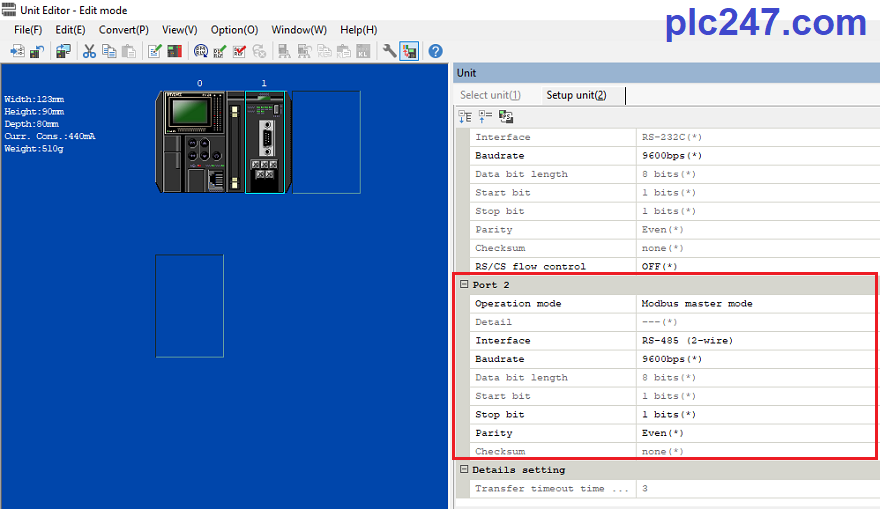
PLC Keyence Modbus RTU Configurator
We need to set the same parameter as the inverter
KV5500 PLC Programming
+ Reset registers when PLC starts running & Control Read/Write

+ Frequency Write Command

+ Control Run Command

+ Read Data Command

+ Read Data Reponse

Video Installing and Running the Program
======
Required documents and software:
+ KV Studio for PLC Keyence Programming
+ LS iG5A VFD Manual PDF Download (Password Extract: plc247.com)
If you need any support, please comment below the article, plc247.com will reply to you as soon as possible.
Best Regards!
